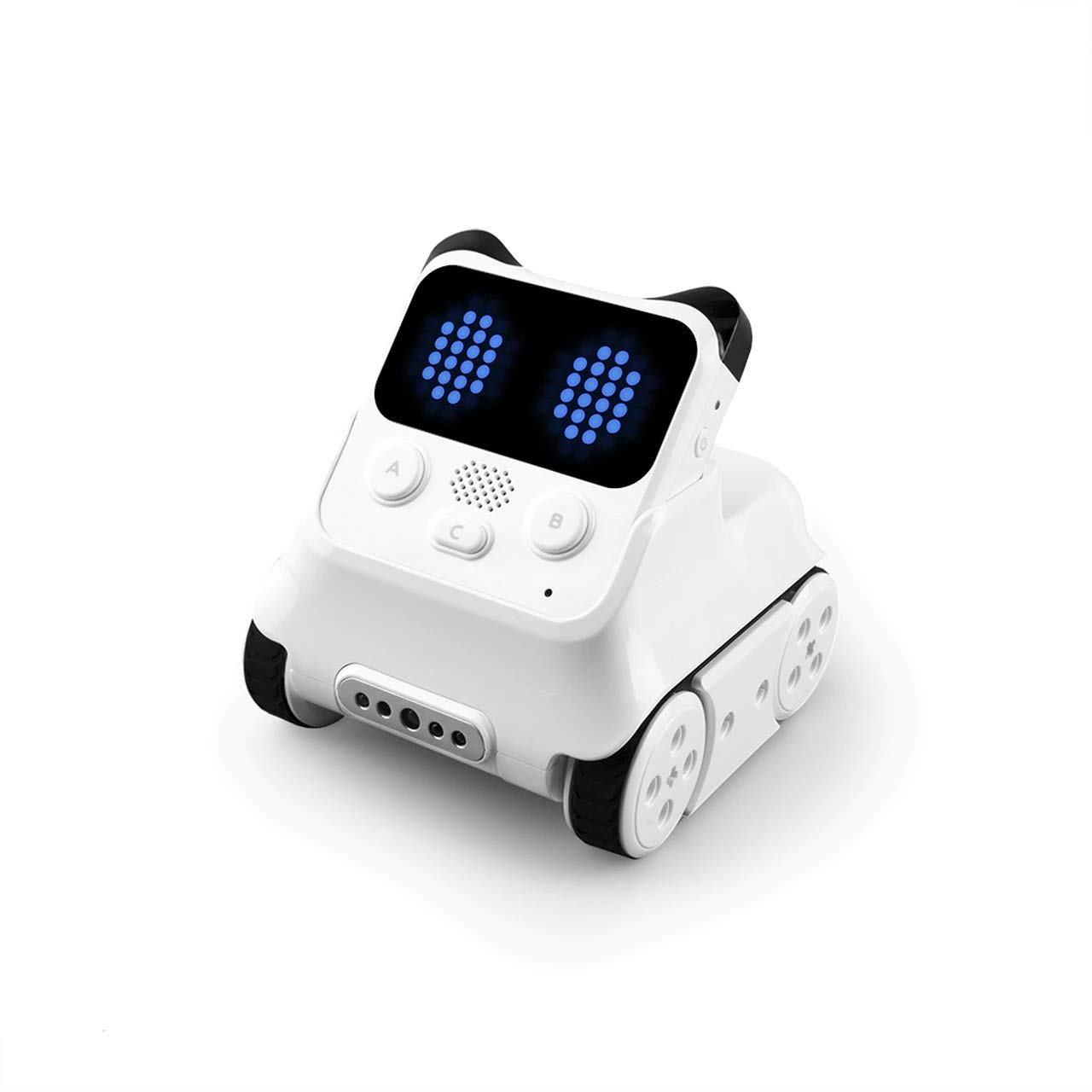
🤖 Code, Play, and Grow: The Emo Robot Every Future Coder Needs!
Makeblock Codey Rocky is an interactive, panda-shaped robot designed for kids 6+ to learn coding through Scratch and Python. It features expressive emotions, building block compatibility, and durable construction, making it an ideal STEM gift that combines fun, creativity, and hands-on learning for young aspiring coders.






| ASIN | B07CGH8NZ7 |
| Batteries | 1 Lithium Polymer batteries required. (included) |
| Best Sellers Rank | #116,776 in Toys & Games ( See Top 100 in Toys & Games ) #1,172 in Educational Science Kits |
| Customer Reviews | 4.4 4.4 out of 5 stars (439) |
| Is Discontinued By Manufacturer | No |
| Item Weight | 1.43 pounds |
| Item model number | P1030024 |
| Manufacturer | Makeblock |
| Manufacturer recommended age | 6 years and up |
| Product Dimensions | 1.58 x 1.47 x 1.59 inches |
| Release date | March 1, 2019 |
R**P
A great interactive way to learn coding. A smart investment for a young (or older) maker!
I bought Codey Rocky for my 9 year old daughter, who is interested in getting started with coding. So far, she loves it! It was easy to set up and to get started. First, we downloaded the android app. The app has three sections: 1) Drive, 2) Draw and Run, and 3) Code. We had a lot of fun with Drive. In this section, we simply drove Codey Rocky around using the on screen joystick. We also had fun changing the pattern displayed on the screen. This was super easy to do, just touch the bubbles on the Android device and it immediately transfers to the robot screen. Drive also has a few buttons that help Codey express some personality. The Draw and Run section was fun too. You draw a pattern on the screen, and Codey will drive in that same pattern on the ground. You can add some light and sound effects by easily dragging and dropping the effects on the line that was drawn. We had fun making an obstacle course and seeing if we could get Codey to navigate it. Before we attempted the coding in section 3, I downloaded the makeblock software to my Windows 10 notebook and looked at the coding examples that are built into that software. I think we could work directly from the notebook, but my daughter copied the examples into the Tablet and I could see she was starting to get the hang of it. She is now trying to combine the coding examples to make more complex programs.
D**L
Easy and fun
My coder was able to make it moving quickly woth python!
J**D
An instant success
Solid little robot, and it's nice that it works right out of the box. Birthday gift for an 8 year old, and with the software already loaded on my (Android) phone it was an instant success. (Almost like getting a new pet...) Very easy to use software for controlling the robot out of the box, and the coding software looks very straightforward as well. (Based on Scratch 2.0) He's used it daily, and is just starting to delve into the coding software to see how to take advantage of sprites (for emotions) and some of the sensors. Key will be engagement with the coding capabilities, otherwise it's kind of an RC vehicle that can display some emotions and a couple of other tricks.
N**L
Make sure you update the firmware first
It isn't emphasized but it won't work right unless the robot firmware is first updated from the website via a PC. My son might be a little too young for the intended audience but he still enjoys the remote control function with the draw-the-face feature, and will probably get into the programming side of it later.
M**A
Es tal cual se describía
P**M
Pretty cool, but the app could be better.
Got this on sale around Black Friday time. As toys go, the hardware is awesome: - Programmable - Connects via bluetooth - Good power to the motors/servos - Multiple sensors - Enough modularity and reconfigurability to make things interesting The software is *sort of* cool. - Very good introduction to programming - Reasonably intuitive drag/drop coding with decisions, branches, subroutines, etc. The problem is that—at least on the iPad version—you can't actually save your program. This is infuriating if you want to spend any time at all (which you'll need to do if you want to make the robot do anything cool). All that time doing drag-and-drop programming and rearranging the little icons/widgets to perform the tasks/tricks you want... and then no way to save. It reminds me of 8-bit BASIC programming back in the '80s when tape and disk drives were $HUNDREDS so parents just bought the computer console without any storage—and then little Timmy would spend hours and hours typing in a program and once typed in, had to leave the computer on for days and days to enjoy the program, because once you powered off, it was gone—and if you wanted to use the program again, you'd have to type it all in again, and that's a whole bunch of no fun. I'd have thought we'd move beyond that by 2020, but apparently not. Maybe the laptop versions are better and enable kids to save. But my kids have an iPad, not a laptop, so... we're stuck with a toy that *could* be amazing if they could build up their experience/knowledge/library of code over time and improve this week on what they did last week, etc. Instead, they're starting from scratch every single time, so each time they've touched it they get about the same amount of distance into things—say, 30 minutes to make it move forward and do one or two things—and they they move on and lose everything. Basically, they've gotten bored with making it do the same thing over and over again. If they were able to save their progress, it would be far more interesting because they'd be working on adding something new each time, and as a result, they would be learning something. Instead, they've learned basically to make it go forward and backward and that's about it because each time they start from scratch. Another one of those science toys that's infuriatingly close to being very cool, but manages to go wrong just as it was about to cross the finish line.
M**Y
Very Nice.
This product is a fun and easy to use toy for someone young that is interested in basic robotics.
E**T
Neat package for early STEM learners
As college professor who frequently does STEM camps at different levels of education, I'm always looking for neat ways to introduce programming concepts and logical thinking with fun at a large possibility of success. The Codey Rockey is a small track-mounted robot (but with a control module that detaches) that uses wireless connectivity to program and control. It isn't big but the features are solid and don't require any wiring or soldering at all. The app already contains a basic "drive" setup, but you can go way beyond that. In addition, their magnetically attached expansion blocks can be used, but there is enough here for beginners to master as it is. The high school girls in my recent STEM camp had a great time exploring the features.
M**E
My 10 year old son loved this! It comes with a downloadable app and connects with no issues through Bluetooth. Even without any coding knowledge this little guy is pretty impressive - you can draw pictures on the face using the app (simple shade each pixel type drawing) and switch between 'emotions' and control him through a simple remote function in the app. For more advanced users it has another app to download which allows the child to use python to write code and also has drag and drop for basic coding learning. We haven't delved too much into the coding as he's been happy running it round the house displaying emotions but I'm sure he'll play around with that side of it before the years out 😄 You do need to charge him before first use but for any impatient terrors just hook it up to a power bank and walk around on a lead that's what we did until it was charged 😅. Great value for money - no subscription to the coding app it is a.once bought it's yours like kids toys used to be ☺️.
T**M
1. Kids love to code with it via design mode. 2. Adults also can practice python coding with this product. 3. Product is good in quality. 4. I feel the product can be sold at a lesser price. 12k I feel overprized.
V**A
We got it during Prime Days so price was awesome. We had the other mBot1 from this company and it was good, so we were ok to try this one. The mBot is more hackable and modular, while Codey is MUCH cuter. It looks like a little cat, and is SO MUCH more expressive, with its wide dot display. We use it to send messages and make our 6yo son do things he normally is reluctant to (“go brush teeth”, “go pee now” etc.). He loves his catbot and is now learning to program it using their block coding app. Their software situation is a bit confusing but you figure it out (which app to use for what, how to connect) and it’s not bad. Tutorials are well done but limited and not a lot. Bluetooth connects well and stays connected. Battery lasts a long time, charges quickly, and the motors are very powerful. You can drive it manually with a phone or tablet and it is easy and fun. It has preset moves and sounds too, but you can program the buttons. Has a few holes to accept Lego Technic pins (not blocks) and that’s a cool feature. Kiddo built a few costumes or tools on top. Has a color detection cam in the front, so you can program it with that too. Light sensor too. And you can also do simple AI stuff! (Small neural network, image recognition). All in all, a good purchase.
T**D
Acheté pour mon fils de 7 ans. Il adore ! Pour programmer le robot un navigateur web suffit, pas besoin d'installer de logiciel. A 7 ans l'enfant doit être accompagné pour la programmation, mais ça vient assez vite.
J**S
He probado otros robots y éste me parece muy apropiado por su facilidad de uso y simplicidad sin renunciar al gran abanico de posibilidades para aprender a programar.
Trustpilot
1 month ago
5 days ago


